
Microsoft Dynamics 365 Business Central Technical Course
Become a certified Dynamics 365 Business Central Developer.
Our course is designed to give you hands-on experience with real development scenarios, helping you build the technical skills employers demand and prepare confidently for developer job roles.
Course Overview
Our Business Central Technical Course is designed to equip professionals with in-depth technical knowledge of Microsoft Dynamics 365 Business Central, one of the world’s leading ERP solutions for small and mid-sized businesses. This course focuses on system architecture, AL development, extensions, integrations, and hands-on technical scenarios to prepare you for development, customization, implementation, and technical consulting roles.
This course provides a comprehensive understanding of Microsoft Dynamics 365 Business Central from a technical consultant’s perspective. You will learn how to develop, customize, and extend Business Central using AL, manage integrations, handle data migration, and support technical implementations effectively.
By the end of the course, you will be confident in building extensions, customizing functionality, managing environments, and working with Business Central across finance, supply chain, sales, purchasing, and operations.
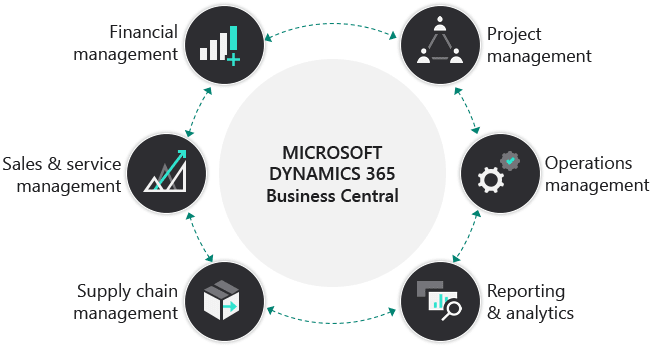
A Dynamics 365 Business Central Developer works on the technical side of Business Central by:
Developing custom features
Extending standard functionality
Integrating Business Central with other systems
Supporting upgrades and performance
They work closely with functional consultants, who define the business requirements.
What Is a Business Central Developer / Technical Consultant?
As a Microsoft Dynamics 365 Business Central developer, you’re responsible for designing, developing, testing, and maintaining solutions based on Dynamics 365 Business Central. In this role, you develop apps that extend Business Central, including customizing or adding extra functionality. You also integrate Business Central with other applications, such as Microsoft Power Platform products. Plus, you need to ensure that data remains current during an upgrade process.
As a Business Central developer, you’re responsible for troubleshooting and debugging issues in the system. This may involve:
Identifying the root cause of a problem.
Fixing bugs.
Testing the solution to ensure that it works as expected.
You may be required to optimize the performance of the system by:
Identifying bottlenecks.
Improving code quality.
You must have applied knowledge of Business Central and the application language (AL), the development environment, and other tools to develop extensions for it. You need some knowledge of how to install and upgrade the system. You should also understand:
Industry terminology.
The Business Central role in relationship to Microsoft 365 and Dynamics 365.
As a developer, you should have knowledge of:
AppSource, Business Central-related technologies, frameworks, and services to build solutions.
Technologies for application lifecycle management (ALM), including source control management (SCM) and continuous integration and continuous delivery (CI/CD).
30+ Hours Online Training Session
Recordings for each session
24/7 Software Access
User guide and Assignments
Corporate Expert Certified Trainers
Flexible Time
Flexible Payment Schedule
Best Price in the Market
Refund Option*
Online One to One Training on Microsoft Teams


Microsoft Dynamics 365 Business Central Technical Course Content
Book Your Training – Get in Touch
Frequently Asked Questions

Get in touch
Book a free consultation today to discover how we can help take your business to the next level.


About Us
Copyright © 2025 | Leaforge Academy All Rights Reserved.
Leawise is a leading training provider specializing in Microsoft Dynamics 365 Business Central. Our mission is to empower professionals, freshers, and organizations with the knowledge and skills required to succeed in modern ERP environments.
Our Solutions
Microsoft Dynamics 365 Business Central
Our Courses
Microsoft Dynamics 365 Business Central - Functional Course
Microsoft Dynamics 365 Business Central - Technical Course


E-mail : Sales@businesscentralerp.com